CI/CD Integration
If you maintain a large rulebase in through version-control managed platform, you may be interested in integrating suricata-check with your Continuous Integration and Continuous Deployment workflows.
This is possible using the --github and --gitlab CLI options. The integration can be further adjusted to the specific deployment environment needs using the other available CLI options.
An example of such an integration for GitHub is available in the suricata-check-action-example repository.
Passing CLI options using an INI file
When integrating suricata-check into a project, it is recommended to configure suricata-check using a .ini file as documented on the documentation page dedicated to configuration using the INI file. By doing so, all collaborators to the project will adhere to the same quality standards and CI/CD linting outcomes will be in-line with local linting outcomes.
GitHub
Integration with GitHub is easy. We recommend using the suricata-check-action to automatically highlight issues in your pull requests.
Unlike basic validators that only confirm a rule is syntactically correct and can be parsed by the Suricata engine, suricata-check performs a comprehensive audit. It evaluates critical factors such as runtime performance, the likelihood of false positives, and whether the rule effectively detects its intended target.
To use it, simply add the following workflow to your repository:
name: Suricata Check

on:
  pull_request:
    branches: ["main", "master"]
  push:
    branches: ["main", "master"]

concurrency:
  group: ${{ github.ref }}
  cancel-in-progress: ${{ github.ref != 'refs/heads/main' }}

jobs:
  suricata-check:
    name: Suricata Check
    runs-on: ubuntu-latest
    strategy:
      fail-fast: true
    steps:
      - uses: actions/checkout@v5

      - name: Set up Python
        uses: actions/setup-python@v6

      - name: Run suricata-check
        uses: Koen1999/suricata-check-action@v1
        with:
          python_version: '3.x'
          extra_args: '--ini suricata-check.ini'
For more details, see the suricata-check-action-example repository.
Below you can find an example of how the issued detected by suricata-check would be highlighted in GitHub.
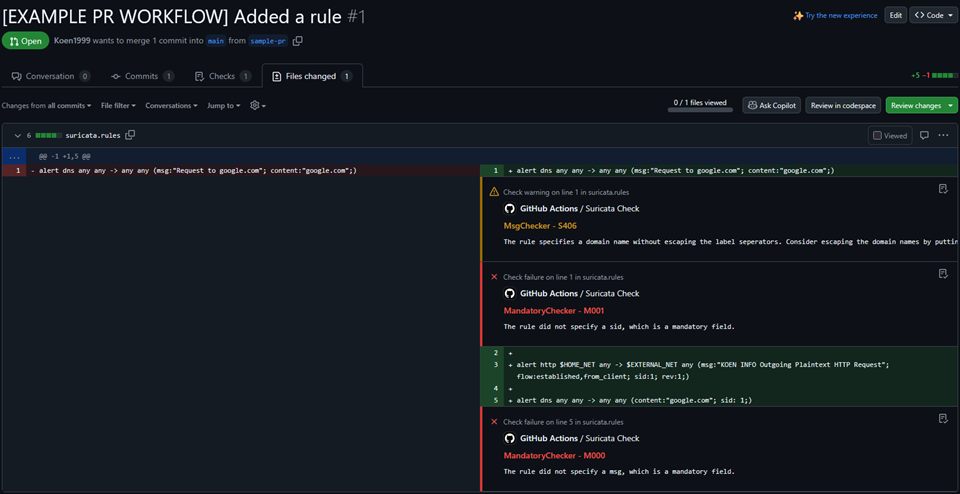
Example GitHub workflow where issues with Suricata rules are highlighted.
GitLab
To integrate suricata-check with GitLab, you need to run it in a workflow with the --gitlab option to produce the suricata-check-gitlab.json file which follows the required CodeClimate report / GitLab Code Quality Report format.
To have GitLab process this output, you need to declare the code quality report using the syntax prescribed by GitLab.